ArcBrain
Now Available — Windows  ·  macOS (coming soon)  ·  Linux (coming soon)

Your AI coding assistant
finally has a memory.

ArcBrain is a persistent memory layer for VS Code Copilot, Cursor, Claude Desktop, and Windsurf. Your decisions, configs, snippets, and context — remembered forever, across every session.

14-day free trial · No credit card required · 1-minute setup
Works with your editors
💙 VS Code Copilot 🔵 Cursor AI 🔶 Claude Desktop 🌊 Windsurf 🟢 Any MCP Client
ArcBrain — MCP Memory Server
$ arcbrain memory_search "stripe integration"

🧠 ArcBrain → Found 12 relevant memories

decision · Use Stripe Checkout, not Elements — simpler webhook flow
config · SUCCESS_URL = https://arcbrain.dev/success (set in Railway)
snippet · License key format: ARCBRAIN-XXXX-XXXX-XXXX (sha256-based)
error · Fixed: webhook 400 → add raw body parser before json()
file · installer/subscription/server.js:61

$
Everything your AI forgets,
ArcBrain remembers.

A full-featured MCP server that stores, searches, and surfaces your development context exactly when you need it.

💾
Persistent Memory
SQLite + ChromaDB vector search. Facts, decisions, configs, snippets, errors, and todos survive every session restart and context window limit.
🔍
Semantic Search
Ask in plain English. ArcBrain finds the most relevant past context using vector embeddings — no exact keyword matching needed.
🤝
Works With Your Editors
Native MCP integration with VS Code Copilot, Cursor, and Claude Desktop. One-click setup via the ArcBrain GUI. No configuration files to edit manually.
📥
Chat History Import
Automatically imports and learns from your existing Cursor and VS Code Copilot conversations — so ArcBrain knows your project history from day one.
�️
Desktop App
A native desktop app gives you a full memory browser — view your fact graph, sessions, snippets, TODOs, and session summaries — all in a beautiful local UI.
56+ MCP Tools
Store facts, track decisions, log errors, manage todos, capture code snippets, record dependencies, and run session summaries — all from your AI editor.
🧩
Browser Extension
A companion browser extension that detects development-relevant tabs (GitHub, MDN, Stack Overflow) and imports them as memory context automatically.
🔒
Fully Local & Private
Your memory stays on your machine. ArcBrain uses a local Ollama instance for AI summarization — no data ever leaves your computer. You own everything.
Constellation Memory Map
See your entire knowledge graph rendered as an interactive visual constellation. Highly-connected nodes glow brightest. Spot gaps, clusters, and relationships in your memory at a glance.
ArcBrain automatically detects project phases, pending decisions, patterns across sessions, and file activity — building your knowledge graph in the background.
56+
MCP Tools
5+
Supported Editors
Memory Capacity
100%
Local & Private
< 1 min
Setup Time

See how your knowledge connects.

ArcBrain doesn't just store memories — it maps the relationships between them. The Constellation Map renders your entire knowledge graph as an interactive visual network, live in your dashboard.

Every fact, decision, snippet, and error becomes a node. Edges show how they reference each other. The more connections a memory has, the brighter and more prominent it glows.

  • Red nodes — your most cross-referenced memories. These are your core project anchors.
  • Orange & yellow nodes — frequently linked context: active decisions, key configs, recurring errors.
  • Green nodes — mid-weight memories: session summaries, resolved issues, useful snippets.
  • Blue nodes — recent or lightly connected memories still building their place in the graph.
Start Free Trial →
fact snippet todo error dep note session config decision rule project summary ArcBrain

Set up in 60 seconds. Remember forever.

ArcBrain runs as a local MCP server. Your AI editor talks to it automatically — no prompts, no manual saving.

1
Download & Install
Run the ArcBrain setup wizard. It detects your editors automatically and connects them in one click.
2
Open Your Editor
ArcBrain starts automatically in the background. Your AI assistant can now read and write to your persistent memory.
3
Never Repeat Yourself
Decisions, configs, snippets, and errors are saved automatically. Pick up any conversation exactly where you left off — days, weeks, or months later.

Not a flat list. A living, aging brain.

Every memory ArcBrain captures — whether from a live AI session right now or imported from ChatGPT history you exported six months ago — enters the same aging pipeline. There are no second-class memories. No silos. One system, one truth.

Layer 1
Working Memory
Raw, freshly-captured facts. Unverified but immediately searchable. Every memory begins here — your Live Watcher fires every 5 minutes pulling what your AI just learned, while imported conversation histories and database reads arrive in bulk. All land in the same place.
Live Watcher ChatGPT Import Claude Import Cursor DB VS Code DB Manual Entry
Layer 2
🔄
Compiled Memory
Facts confirmed across multiple sessions or sources. Contradiction detection runs here: when "we use Postgres" and "we migrated to SQLite" both exist, the system scores each by recency, source reliability, and reference count — and picks a winner. Confidence scores track certainty over time.
Contradiction scoring · Confidence tracking · Source attribution
Layer 3
Canonical Memory
Battle-tested truth. Nightly distillation consolidates high-confidence compiled memories into clean canonical facts. These become the brightest nodes in your Constellation Map — the authoritative answers your AI tools receive first when context is retrieved.
Nightly auto-consolidation · Highest confidence · Knowledge graph anchors
🔗
One format. Zero silos. A memory captured by the Live Watcher from your Cursor session and a memory parsed from a 2-year-old ChatGPT export share the exact same internal schema — confidence score, source, provenance chain, vector embedding, category, and timestamp. ArcBrain makes no distinction between "imported" and "live" memories. Everything ages equally. When you import your history from day one, it's not a one-time dump — those memories decay, reinforce, and distill just like anything else.

Try free for 14 days. No credit card.

Start with a full-featured 14-day free trial. Pick the plan that fits — monthly flexibility or a one-time lifetime deal.

Solo
$19
per month · cancel anytime · 1 machine
Everything you need on a single machine. Full access to all 56+ MCP tools and the complete memory pipeline. Includes a 14-day free trial.
  • 14-day free trial included
  • 1 machine / device
  • Unlimited local memory
  • 56+ MCP tools
  • VS Code, Cursor, Claude Desktop
  • 3-layer memory aging pipeline
  • + Remote Access: +$5/mo add-on
  • + Extra machines: +$10/mo each
Start Free Trial →
🔥 Beta Price
Lifetime
$199
one-time · limited time · normally $299
Lock in lifetime access at our beta launch price. Pay once, own it forever. Remote Access and Cloud Backup are included — no add-ons needed.
  • 14-day free trial included
  • Unlimited machines / devices
  • Everything in Pro
  • Lifetime updates — all future features
  • Remote Access included (no add-on)
  • Cloud Backup included
  • No recurring charges, ever
  • Founding user status
  • Input on roadmap
Get Lifetime Access →
Add-ons available for Solo & Pro: Remote Access (access your ArcBrain from any browser, anywhere) — $5/mo. Extra machines beyond your plan — $10/mo per machine. Both are included free with Lifetime.

See exactly how we stack up.

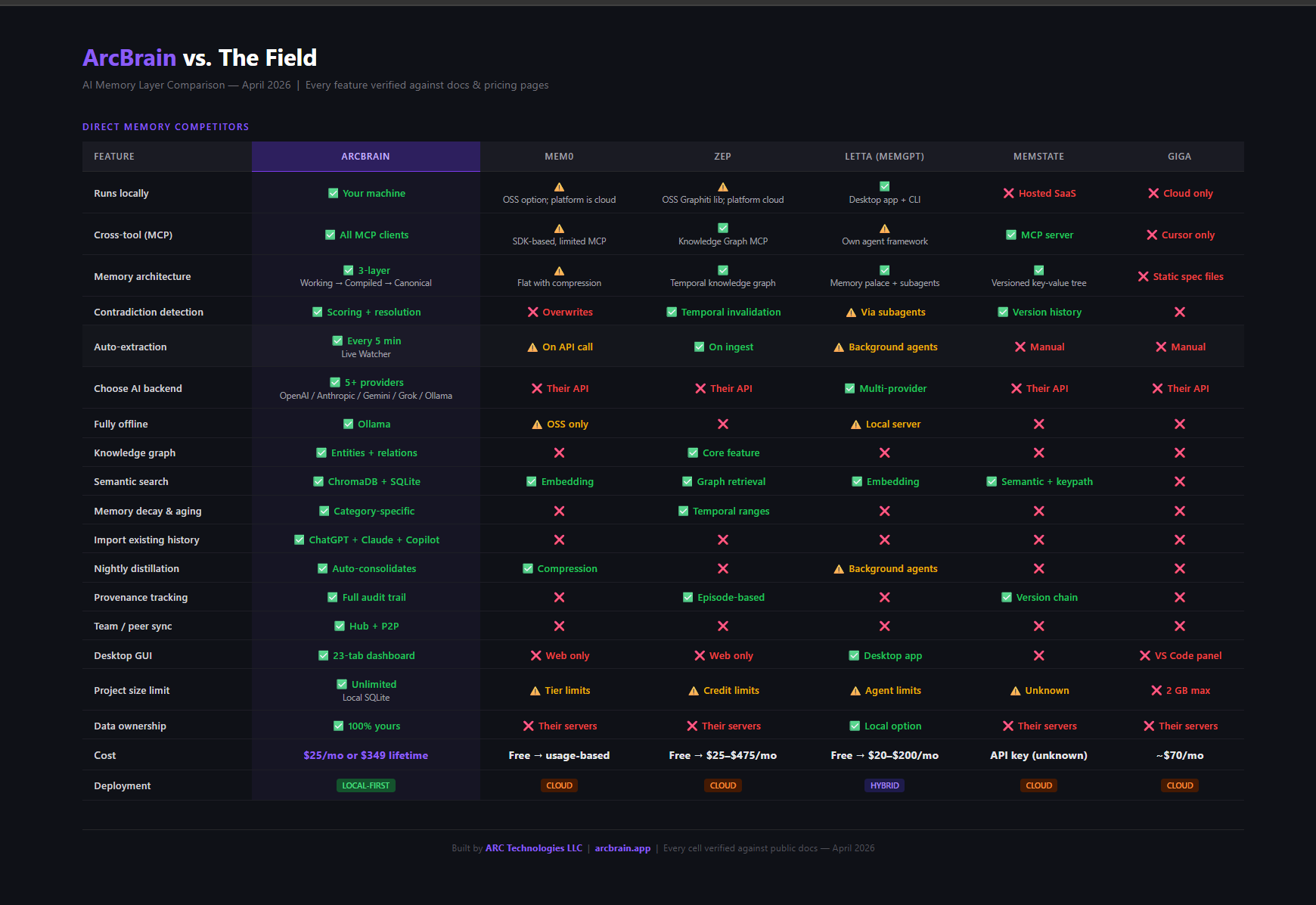
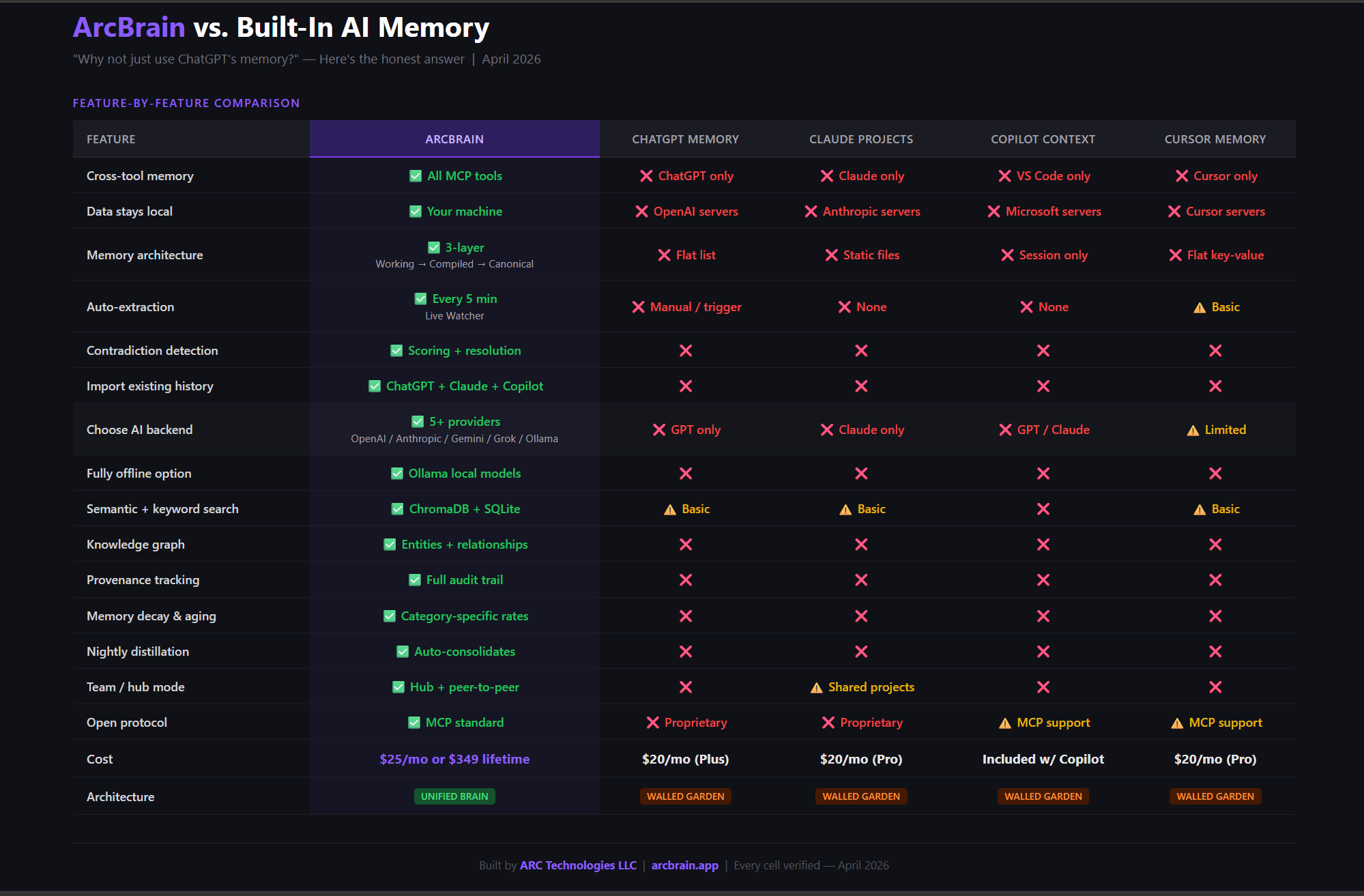
We compared ArcBrain against built-in AI memory tools (ChatGPT, Claude, Copilot, Cursor) and direct memory competitors (Mem0, Zep, Letta, MemState, Giga). Every cell verified against public docs — April 2026.

ArcBrain vs Built-In AI Memory — Feature Comparison Table

ArcBrain vs. the built-in memory of ChatGPT, Claude Projects, GitHub Copilot, and Cursor — every feature verified

ArcBrain vs Mem0, Zep, Letta, MemState, Giga — Feature Comparison Table

ArcBrain vs. direct AI memory competitors: Mem0, Zep, Letta (MemGPT), MemState, and Giga — every feature verified against public docs

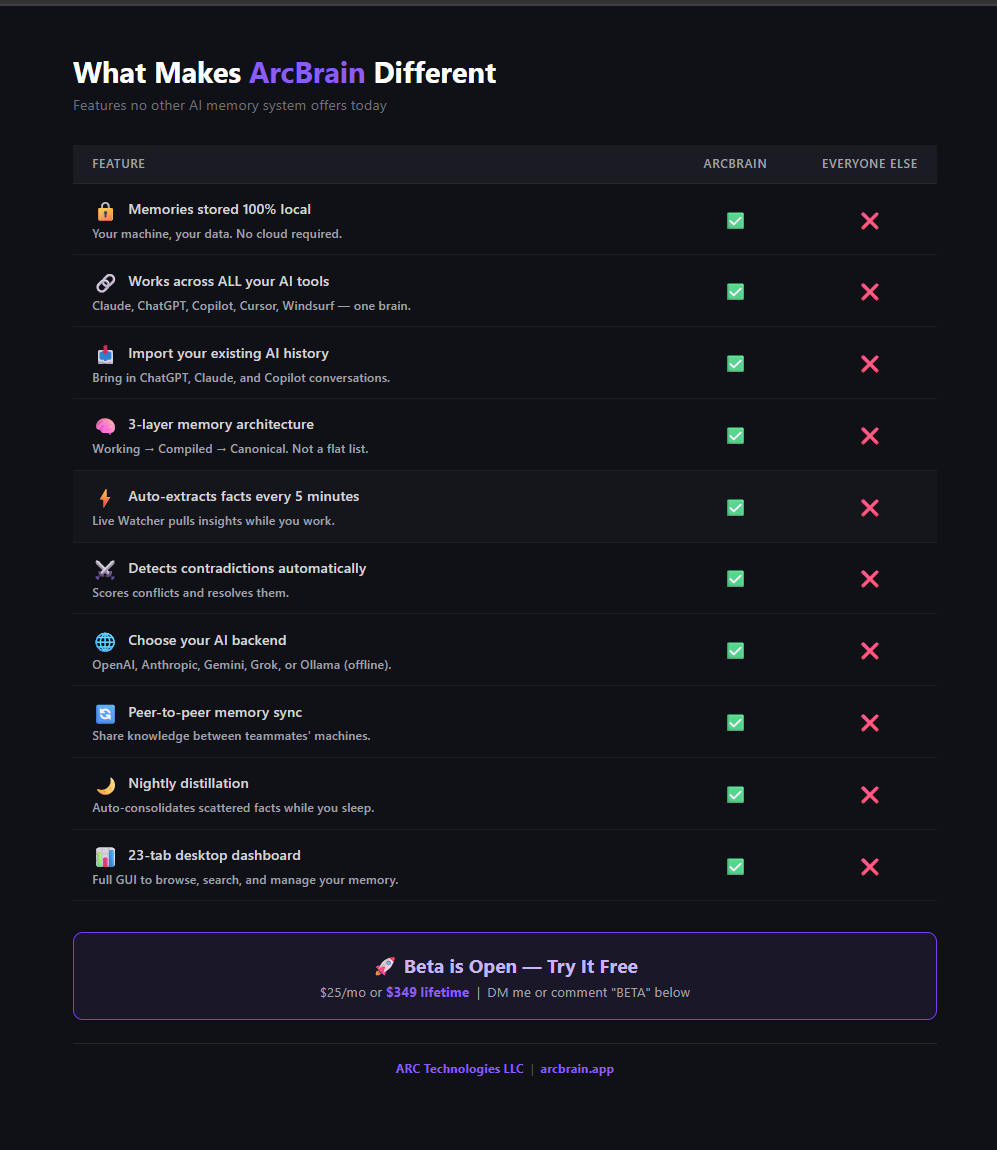
What Makes ArcBrain Different — 10 Features No Other Memory System Has

10 things ArcBrain does that no other AI memory system offers today


Why ArcBrain is fundamentally different.

Most "AI memory" tools are locked to one model, one tool, one session. ArcBrain was built on a different assumption: your knowledge belongs to you, not to any one AI product.

🔀
Cross-Tool Memory — One Brain, All Editors

ArcBrain connects to VS Code Copilot, Cursor, Claude Desktop, and Windsurf simultaneously via MCP. Fix a bug in Copilot — Cursor knows about it in 5 minutes. The same memory store powers every tool.

ChatGPT memory is ChatGPT-only. Cursor memory lives in Cursor only. Claude Projects are Claude-only. ArcBrain is the only system where knowledge genuinely flows across all your AI tools without you doing anything.

🧩
Model Agnostic — Your Memory Follows Your Model Choice

ArcBrain doesn't care which AI model you use. GPT-4o in Copilot today, Claude Sonnet in Cursor tomorrow, Gemini in Windsurf on your laptop — they all pull from the same persistent brain.

Your memory isn't locked to OpenAI, Anthropic, or Google. Switch models or providers any time. The knowledge is yours, not theirs.

📐
Unified Memory Format — No Silos, No Translation

Every memory — regardless of where it came from — is stored in the same structured schema: key, value, category, confidence score, source, provenance chain, vector embedding, and timestamp.

A decision your AI captured from Cursor today is structurally identical to a fact parsed from a 2-year-old ChatGPT export. Unified format means unified search, unified aging, and unified retrieval — no translation layer, no lossy conversion.

🧠
Active Memory Metabolism — Not a Static Store

ArcBrain's memory isn't a bucket you pour facts into. It has a metabolism. Facts decay over time if unused. Facts strengthen when referenced repeatedly. Contradictions are detected and scored. Nightly distillation promotes high-confidence facts to canonical status.

Older imported memories age exactly like live memories. Import 18 months of ChatGPT history and those facts start competing, reinforcing, and distilling — just like anything captured today.

🔒
Local-First, With Real Privacy Controls

All data lives in SQLite + ChromaDB on your machine. The MCP server is a local process. AI summarization runs locally via Ollama if you choose — zero cloud dependency.

PII detection scans every memory at ingestion. Emails, phone numbers, API keys, and tokens are flagged before storage, with optional automatic redaction. You decide what gets stored.

⚙️
Open Protocol (MCP) — Not a Walled Garden

ArcBrain communicates via the Model Context Protocol — an open standard, not a proprietary API. Any MCP-compatible tool can connect. As the ecosystem grows (and it's growing fast), ArcBrain works with new tools automatically.

Competitors force you into their SDK, their rate limits, their per-query pricing. ArcBrain runs on your machine, on your terms, with no per-query costs.


Common questions

Does ArcBrain send my data anywhere?

No. ArcBrain runs entirely on your local machine. Your memory is stored in a local SQLite database and a local ChromaDB vector store — both on your computer. The optional AI summarization uses Ollama (also local). The only network call is optional: license validation.

What editors does ArcBrain support?

ArcBrain works with any editor that supports the Model Context Protocol (MCP). Currently that includes VS Code with GitHub Copilot, Cursor, and Claude Desktop. The ArcBrain setup wizard auto-detects your editors and writes the configuration for you — no manual JSON editing required.

Do I need Ollama or any AI model running locally?

No — Ollama is optional. The core memory features (storing, searching, and retrieving facts, snippets, decisions) work without any local AI model. Ollama (llama3.2:3b or similar) is only needed if you want automatic end-of-session summaries. The setup wizard will let you enable or skip it.

Is there a free trial?

Yes — every plan includes a 14-day free trial with no credit card required. You get full Pro access during the trial. After 14 days, choose the Pro Monthly ($25/mo) or Lifetime ($199 beta, normally $299) plan to continue. If you don't upgrade, your local memory data is always yours to keep.

How is this different from using a .cursor/rules file or system prompt?

Static rules files require you to manually write and maintain context. ArcBrain automatically captures and persists context as you work — decisions you make, errors you solve, configs you set, todo items, and more. It also supports semantic search so your AI can find relevant memories from months ago without you having to remember to include them.

Can I migrate my data if I change machines?

Copy your ~/arcbrain/data/ folder to the new machine — it contains your full SQLite database and ChromaDB vector store. Run the installer on the new machine and it will pick up where you left off. The setup wizard auto-connects your editors, so you're back in business in under a minute.

Do imported memories (ChatGPT, Claude, Cursor, VS Code) go through the same aging process as live memories?

Yes — completely. Every memory, regardless of source, enters the same three-layer pipeline. A fact parsed from a 2-year-old ChatGPT export starts in Working Memory alongside anything captured by the Live Watcher five minutes ago. From there it ages identically: contradiction detection runs, confidence scores update as the fact gets referenced or ignored, and nightly distillation promotes high-confidence facts to Canonical status. There is no "imported" category. There are no second-class memories. If you import 18 months of Cursor conversations on day one, those facts don't sit inert — they immediately become part of the active knowledge graph, competing, reinforcing, and distilling just like live captures.

How does ArcBrain compare to Cursor's built-in memory?

Cursor's memory relies on .cursor/rules files and system prompts you write by hand — static, session-scoped, and tied to one editor. ArcBrain automatically captures decisions, errors fixed, configurations set, and project context as you work. Every memory is semantically searchable and shared across VS Code Copilot, Cursor, Claude Desktop, and Windsurf simultaneously. Think of it as a persistent second brain that all your AI tools pull from, rather than a per-editor rules file you have to maintain.

What is Giga Memory, and how does ArcBrain relate to it?

Giga Memory (also called Gigaboost) was a cloud-based AI memory service. ArcBrain is a more powerful self-hosted alternative built by ARC Technologies — no monthly cloud fees, no data leaving your machine. You get the same persistent-context superpowers (and then some: semantic search, multi-editor support, structured fact storage, session summaries) running entirely on your own hardware via a local MCP server.


Install in one command.

Currently available on Windows. macOS & Linux coming soon.

irm https://arcbrain.pages.dev/install.ps1 | iex Windows PowerShell
14-day free trial · No credit card required · Opens setup wizard at localhost:9876